
Custom Data Pipelines
Custom Data Pipelines turn specialized data sources—like county foreclosure dockets, auction sites, code-enforcement portals, or tax delinquent lists—into automated property signals within Goliath. Each pipeline runs a scraper on a schedule, normalizes the data, matches it against your properties, and optionally sends webhooks to integrate with your CRM or other systems.
What You Get with a Pipeline
Section titled “What You Get with a Pipeline”Once a pipeline is active, Goliath provides:
- Scheduled scraper: Runs real-time or daily against your requested data source
- Normalized property signals: Extracted data is matched against your organization’s property records
- Webhook delivery: Optional HTTP POST notifications to your configured URL when matching signals are detected
- Activity feed: A detailed log showing records extracted, last run timestamp, and match rate
Pipelines move through several states: REQUEST_RECEIVED (under review), SUBSCRIPTION_UPGRADE_REQUIRED (plan upgrade needed), IMPLEMENTING (scraper being built), ACTIVE (live), PAUSED, or PAYMENT_REQUIRED. Only ACTIVE pipelines dispatch webhooks and count toward your quota.
Step-by-Step Guide
Section titled “Step-by-Step Guide”-
Navigate to Custom Data Pipelines
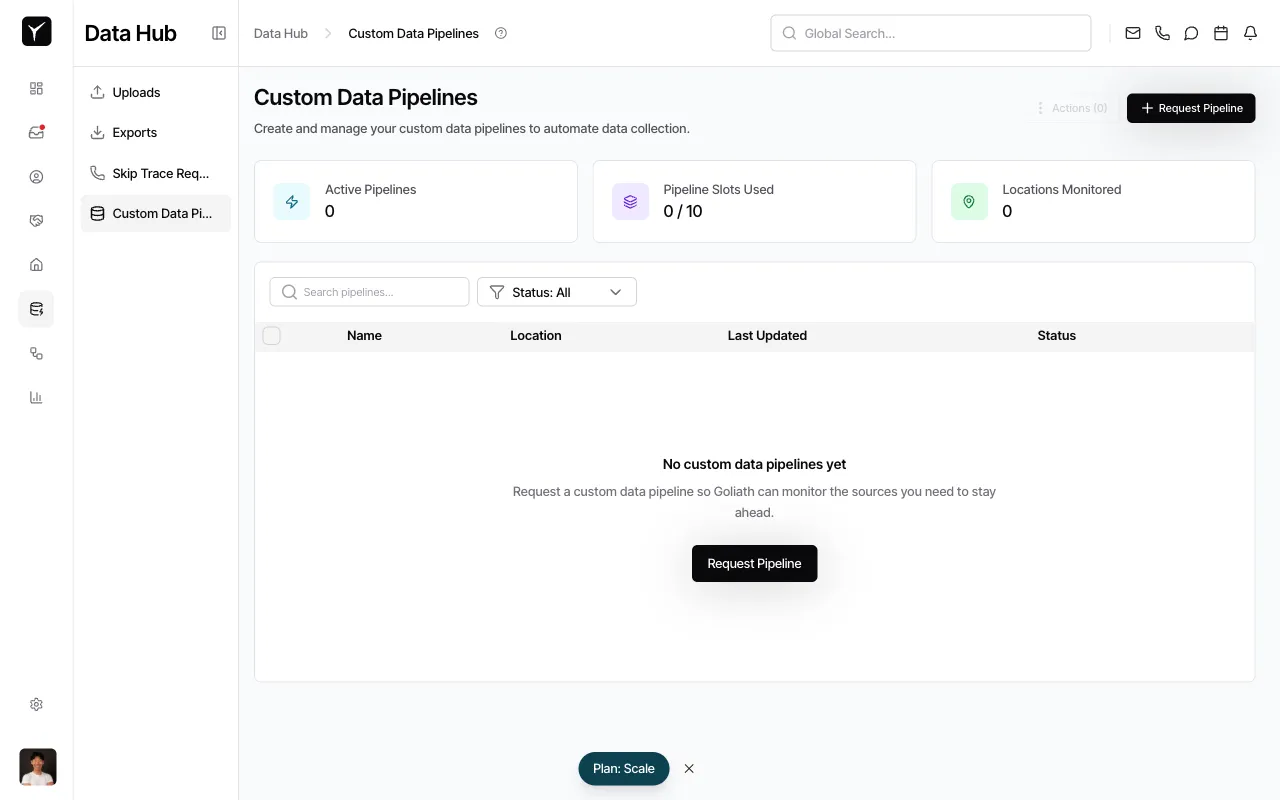
From the sidebar, click Custom Data Pipelines under Data Hub. You’ll see a dashboard showing Active Pipelines, Pipeline Slots Used, and Locations Monitored.
-
Open the request dialog
Click the Request Pipeline button in the top-right corner. A dialog titled Request Custom Data Pipeline will appear.
-
Fill in pipeline details
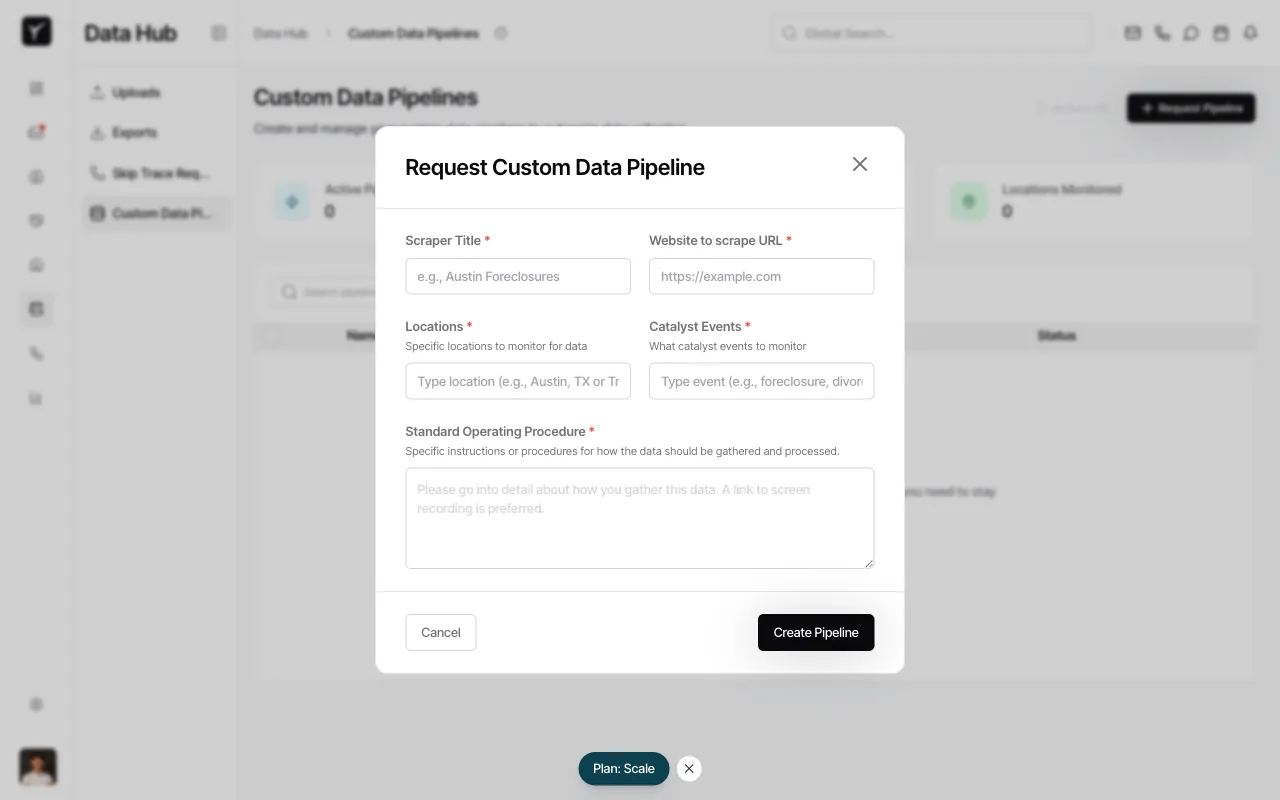
Complete the required fields:
- Scraper Title: A descriptive name for the pipeline
- Website to scrape URL: The public URL of the data source
- Locations: Geographic areas to monitor (e.g., cities, counties, or states)
- Catalyst Events: The property signals to track (e.g., new foreclosure filings, status changes, price drops)
- Standard Operating Procedure: Detailed instructions on how to gather and process the data; a screen recording link is preferred
-
Submit your request
Click Create Pipeline. Your request is submitted immediately—Goliath operations will review it and begin implementation. You’ll see the new pipeline appear in the table with a status of REQUEST_RECEIVED or SUBSCRIPTION_UPGRADE_REQUIRED depending on your plan.
Webhook Integration
Section titled “Webhook Integration”Active pipelines can send real-time notifications to your own systems. Each webhook delivers a POST request with a JSON payload containing the matched property signal. Goliath includes X-Goliath-Pipeline-Id and X-Goliath-Property-Signal-Id headers for tracking.
Configure webhook URLs on the pipeline detail page (admin access required). Use these integrations to trigger CRM updates, Slack alerts, or data warehouse ingestion.
Pipeline Lifecycle
Section titled “Pipeline Lifecycle”- REQUEST_RECEIVED: Your request is queued for review by Goliath operations
- SUBSCRIPTION_UPGRADE_REQUIRED: Your current plan does not support additional pipelines—upgrade to proceed
- IMPLEMENTING: The scraper is being built and tested
- ACTIVE: Pipeline is live and dispatching signals
- PAUSED: Temporarily disabled
- PAYMENT_REQUIRED: Billing issue preventing operation
Implementation timelines vary based on data source complexity. Goliath operations will contact you if additional details are needed.
Frequently Asked Questions
Section titled “Frequently Asked Questions”Q: How long does it take for a pipeline to go live?
Section titled “Q: How long does it take for a pipeline to go live?”Implementation time varies by data source complexity. Simple public sites may go live within days; more intricate sources can take longer. Goliath operations will notify you of progress.
Q: Can I edit a pipeline after requesting it?
Section titled “Q: Can I edit a pipeline after requesting it?”Contact Goliath support to update pipeline parameters. You cannot self-edit a pipeline once submitted.
Q: What kinds of data sources are realistic?
Section titled “Q: What kinds of data sources are realistic?”Publicly accessible websites without authentication barriers work best. Examples include county clerk portals, municipal code enforcement databases, public auction listings, and court docket feeds.
Q: Can I have multiple pipelines?
Section titled “Q: Can I have multiple pipelines?”Yes. Your plan determines the number of Pipeline Slots available. Upgrade your subscription to add more pipelines.
Q: How do I know when new signals are found?
Section titled “Q: How do I know when new signals are found?”Configure a webhook URL to receive instant POST notifications. You can also view the activity feed on the pipeline detail page for a historical log of extracted records and matches.