
How Do I Set Up a Phone Number?
Organization admins can provision new phone numbers directly in Goliath by searching available inventory from Twilio. Once purchased, the number lands in your organization’s Unassigned pool and can be assigned to team members for outbound calling and texting. Provisioned numbers work immediately for calling but require A2P 10DLC registration before outbound SMS is enabled.
Step-by-Step Guide
Section titled “Step-by-Step Guide”-
Open the Add Number flow
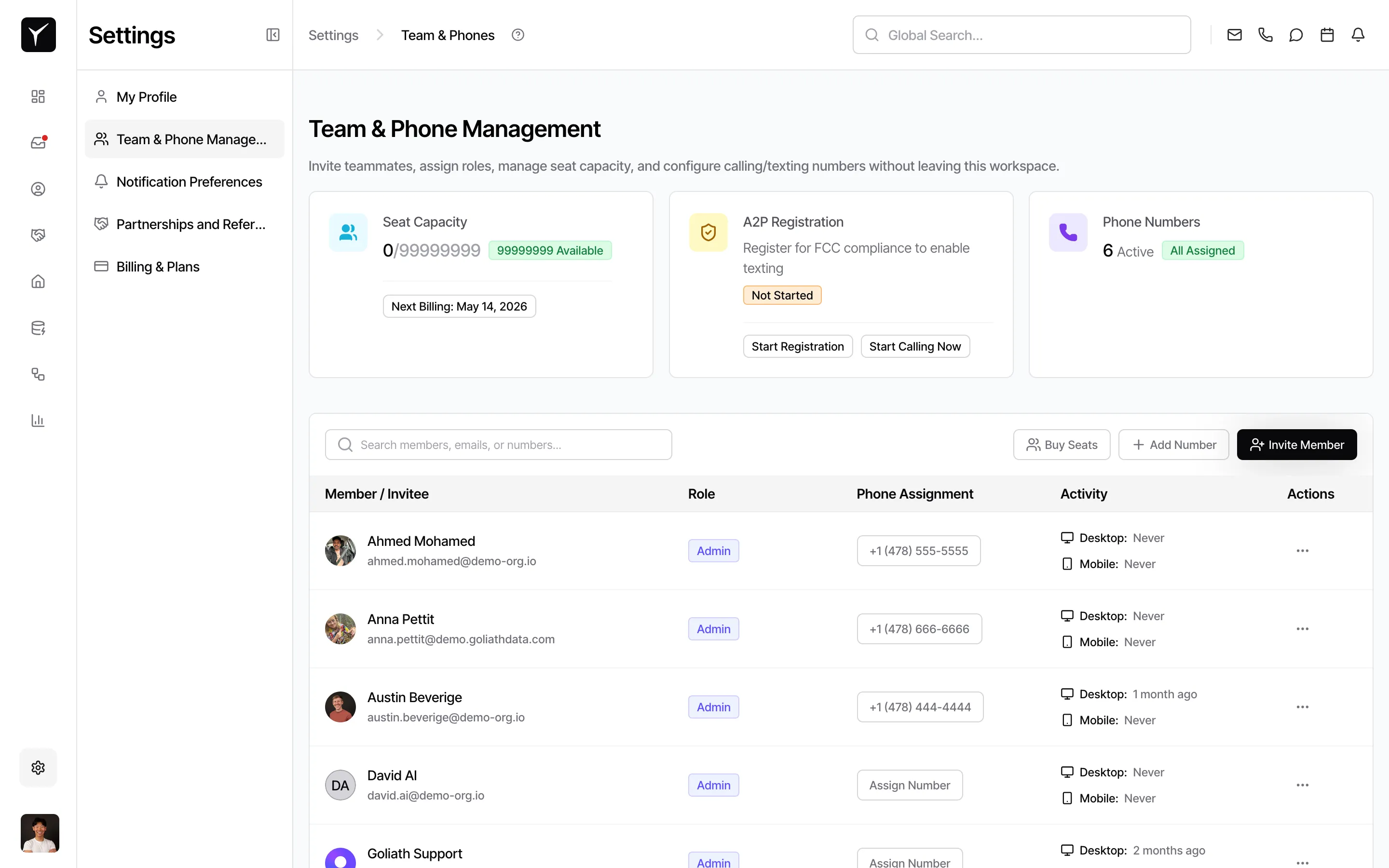
Navigate to Settings > Team & Phone Numbers and click the Add Number button. Only organization admins have access to this feature.
-
Search for available numbers
Enter an area code (e.g.,
732) or a specific prefix (e.g.,732-7325for vanity patterns) to filter the search. Goliath queries Twilio’s inventory in real time and displays matching numbers. -
Select a number
Review the list of available numbers and choose the one that fits your needs. Availability varies by region and prefix—vanity or memorable patterns may have limited options.
-
Confirm purchase
Click Continue or the purchase confirmation button. The number is provisioned immediately and added to your organization’s Unassigned pool. Billing for the monthly number fee begins on the next invoice cycle.
After Provisioning
Section titled “After Provisioning”Once the number is in the Unassigned pool:
- Assign to a user: Use the Manage Phone Sheet to assign the number to a team member. See How Do I Assign a Phone to a User for details.
- Set up A2P 10DLC for texting: Outbound calling works immediately, but outbound SMS requires Twilio’s A2P brand and campaign registration (a US carrier compliance step). This typically takes a few business days. See Sending Text Messages and the A2P setup guide in Team & Phone Numbers.
- Check billing: Review your monthly number fees and usage costs in the Billing section.
Frequently Asked Questions
Section titled “Frequently Asked Questions”Q: Can I pick a specific vanity number?
Section titled “Q: Can I pick a specific vanity number?”You can search by area code and prefix to find patterns (e.g., 732-REAL = 7327325), but availability depends on Twilio’s inventory at the time of search.
Q: How long until the number works?
Section titled “Q: How long until the number works?”Calling: Immediately after provisioning. Texting: Only after your organization’s A2P 10DLC registration is approved by Twilio, which typically takes a few business days.
Q: Can I return or drop a number?
Section titled “Q: Can I return or drop a number?”Yes. Release the number from the Unassigned pool in Team & Phone Numbers to stop future billing. This action is permanent and cannot be reversed.
Q: What countries are supported?
Section titled “Q: What countries are supported?”Goliath primarily provisions US and Canadian phone numbers via Twilio. Contact support for other regions.
Q: What if I already have a business number?
Section titled “Q: What if I already have a business number?”You can port your existing number into Goliath to retain it. Contact support to initiate the porting process instead of purchasing a new number.