
Partnerships and Referrals
Partnerships allow two separate Goliath organizations to collaborate on deals and exchange referrals without sharing their entire pipelines. This is ideal for wholesalers partnering with investors, joint ventures on flips, or referral networks across different markets. Only organization admins can create, accept, or end partnerships.
Step-by-Step Guide
Section titled “Step-by-Step Guide”-
Navigate to the Partnerships page
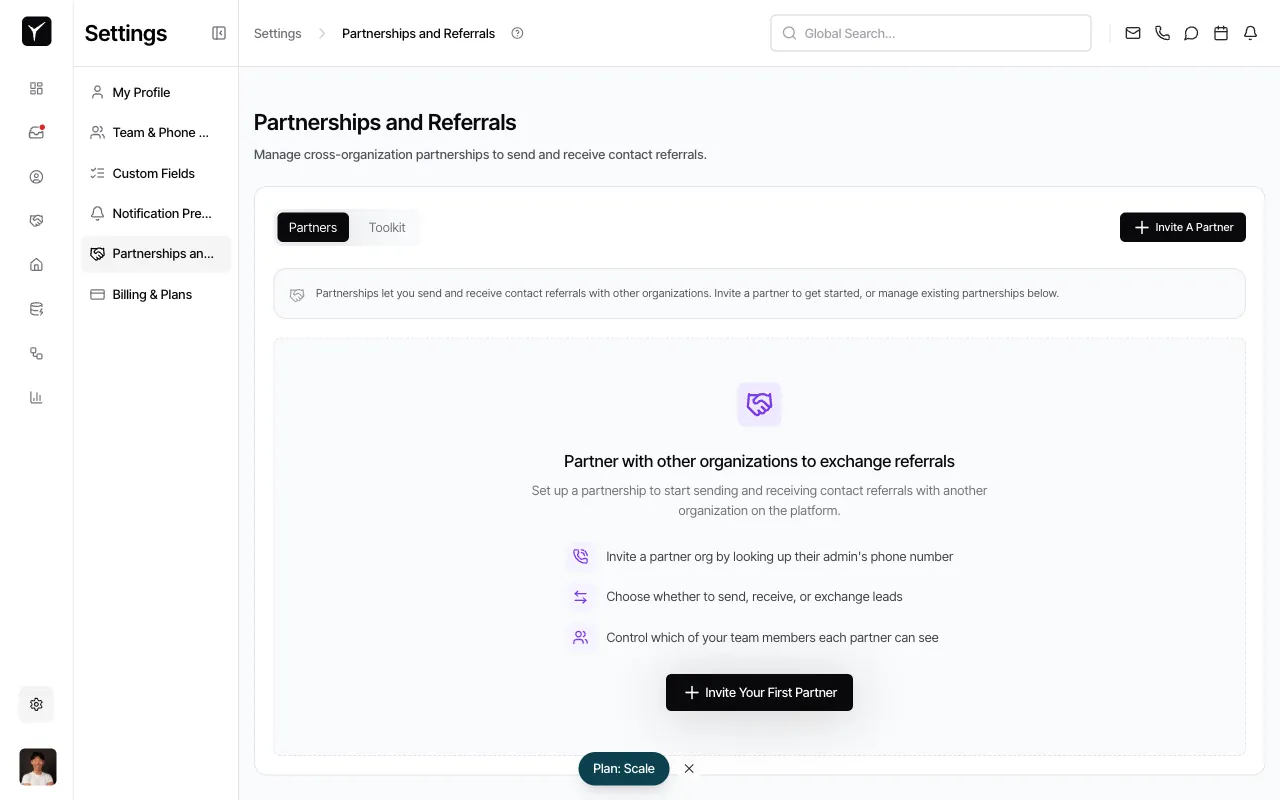
In the left sidebar, click Settings, then select Partnerships and Referrals. You’ll see the Partners tab selected by default.
-
Invite a new partner
Click the Invite A Partner button in the top-right corner or the Invite Your First Partner button in the center of the page. You will be prompted to enter the partner organization admin’s phone number or email to send the invitation.
-
Accept or manage invitations
Pending partnership invitations (both sent and received) appear on this page. If you’ve received an invitation, you can accept it to establish the partnership. Once accepted, the partner organization will appear in your active partnerships list.
-
Share deals or contacts selectively
After a partnership is active, you can share specific deals or contacts with that partner. Navigate to the deal or contact record and choose to share it with your partner. The partner will only see what you explicitly share — they do not gain access to your entire database.
-
End a partnership
To end a partnership, locate the partner in your active partnerships list and select the option to remove or end the partnership. This stops future sharing, but data already exchanged remains accessible to both organizations.
Frequently Asked Questions
Section titled “Frequently Asked Questions”Q: What data does my partner organization see?
Section titled “Q: What data does my partner organization see?”Your partner only sees deals and contacts you explicitly share with them on a per-deal or per-contact basis. They do not have access to your entire pipeline or contact database.
Q: Can I end a partnership?
Section titled “Q: Can I end a partnership?”Yes. Ending a partnership stops future sharing, but data that was previously exchanged remains accessible to both organizations for record-keeping purposes.
Q: Is there a cost to create partnerships?
Section titled “Q: Is there a cost to create partnerships?”Typically no. Partnerships are included in most Goliath plans, but check Billing & Plans in Settings to confirm your plan’s features.
Q: Can my organization have multiple partners at once?
Section titled “Q: Can my organization have multiple partners at once?”Yes. You can establish partnerships with multiple organizations and manage them all from the Partnerships and Referrals page.
Q: Who can create or accept partnerships?
Section titled “Q: Who can create or accept partnerships?”Only organization admins can send, accept, or end partnership invitations. Team members with lower permission levels cannot manage partnerships.