
Understanding Property Details
The property detail page is your command center for evaluating investment opportunities. It aggregates property characteristics, ownership data, financial signals, and market context in one place. Understanding what’s available—and what it means—helps you quickly qualify leads, identify distress or motivation, and decide whether to reach out.
Step-by-Step Guide
Section titled “Step-by-Step Guide”-
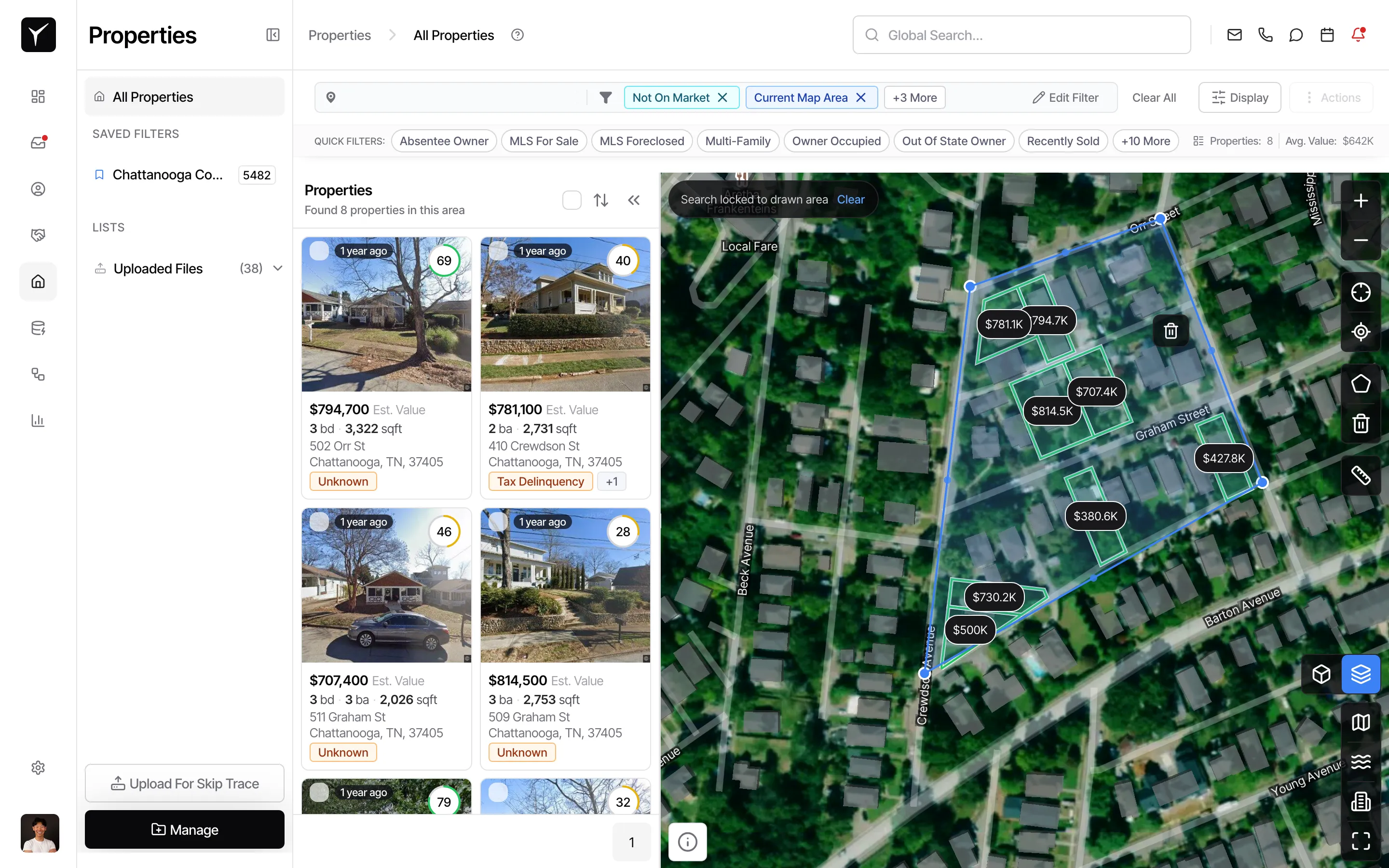
Open a property detail page
Click any property card from your search results or saved list to open its full detail view.
-
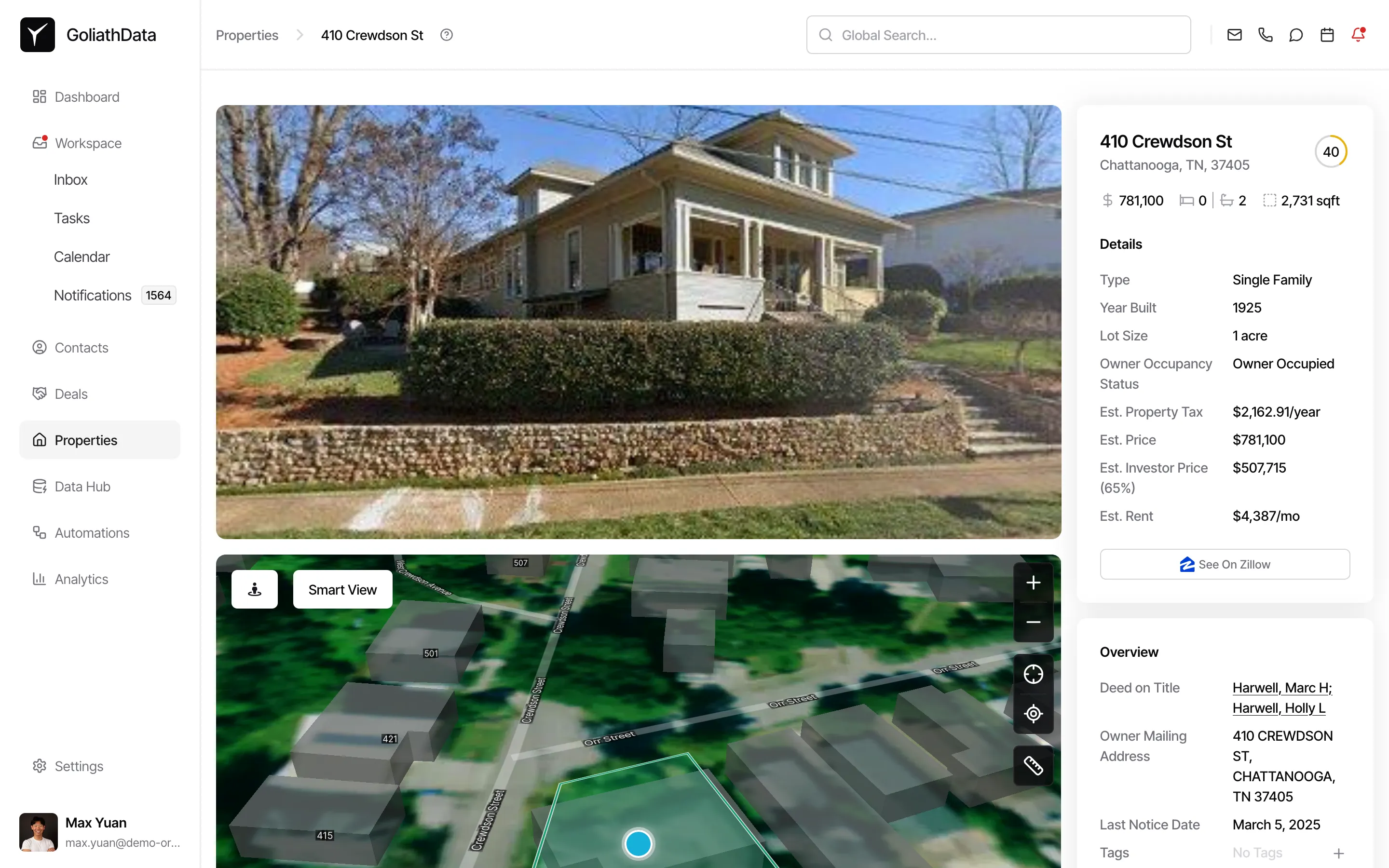
Review the Overview tab
The Overview tab displays high-level property information and quick-access tools for communication.
-
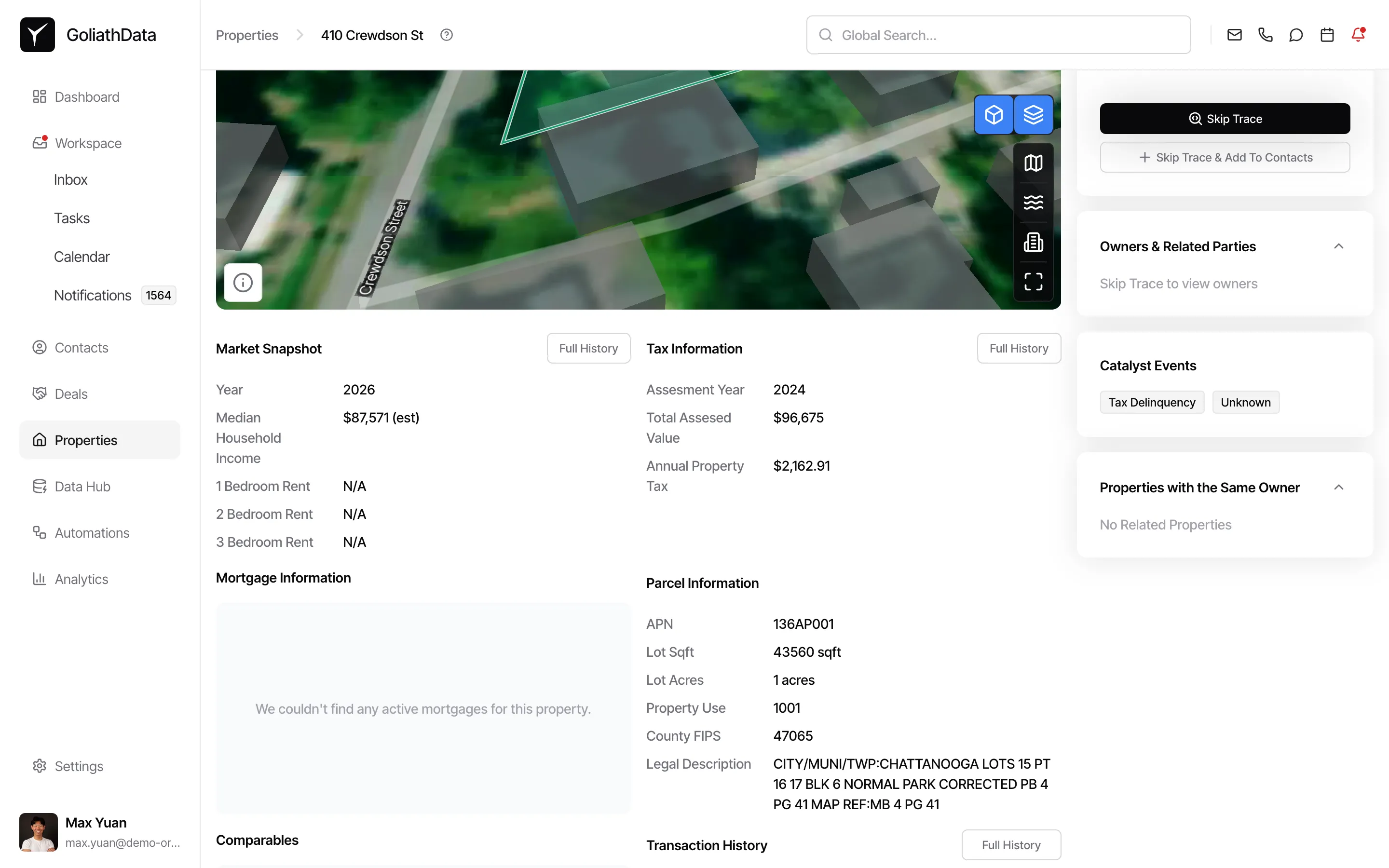
Scroll to explore all data sections
Continue scrolling to view additional sections including Market Snapshot, Tax Information, Mortgage Information, Parcel Information, Transaction History, Owners & Related Parties, Catalyst Events, and Properties with the Same Owner.
What Data is Available
Section titled “What Data is Available”Property Basics
Section titled “Property Basics”Goliath surfaces core property characteristics including address, property type, year built, lot size, and square footage. This helps you quickly assess whether the property fits your acquisition criteria (e.g., single-family vs. commercial, minimum lot size for development).
Valuation and Equity
Section titled “Valuation and Equity”Estimated property value and estimated equity are calculated based on recent sales, tax assessments, and market trends. High equity signals cash-out refinance opportunities or motivated sellers who have substantial value to unlock.
Ownership and Occupancy
Section titled “Ownership and Occupancy”The Owners & Related Parties section shows the current owner name, owner mailing address, and occupancy status (owner-occupied vs. absentee). Absentee owners—especially those with out-of-state mailing addresses—are statistically more likely to sell off-market. Length of ownership helps identify long-term holders who may be ready to liquidate.
MLS and Listing Status
Section titled “MLS and Listing Status”When available, Goliath displays whether the property is currently on the market, off-market, or recently sold. Days on market, list price, and sale history reveal pricing trends and seller motivation. A property that’s been listed multiple times or sat on the market for months may indicate a motivated seller or overpricing.
Financial Signals
Section titled “Financial Signals”The Mortgage Information section includes loan amount, interest rate, term, lender, and buyer/seller details from the most recent transaction. High loan-to-value ratios or recent refinances can indicate financial stress or opportunity for a subject-to deal.
Tax Information
Section titled “Tax Information”Estimated property tax, assessed value, and tax delinquency status appear under Tax Information. Tax-delinquent properties are a strong distress signal—owners behind on payments may be open to a quick sale to avoid foreclosure or liens.
Catalyst Events
Section titled “Catalyst Events”The Catalyst Events section highlights recent or pending events such as liens, code violations, pre-foreclosure notices, or auction dates. These are high-intent signals that a property may be in distress or that the owner is facing financial or legal pressure.
Parcel and Legal Details
Section titled “Parcel and Legal Details”Parcel Information displays the APN (Assessor’s Parcel Number), lot square footage, lot acreage, property use code, county FIPS code, and legal description. This data is critical for title research, zoning analysis, and verifying boundary information.
Transaction History and Comparables
Section titled “Transaction History and Comparables”The Transaction History section lists prior sales with dates and sale prices, helping you understand appreciation trends and holding periods. The Comparables section (when available) shows recently sold properties nearby, giving you a market-based valuation benchmark.
Related Properties
Section titled “Related Properties”The Properties with the Same Owner section reveals other properties in the same owner’s portfolio. If an owner holds multiple properties, they may be a professional landlord or investor open to portfolio sales or bulk transactions.
Frequently Asked Questions
Section titled “Frequently Asked Questions”Q: What does “owner-occupied” vs. “absentee owner” mean?
Section titled “Q: What does “owner-occupied” vs. “absentee owner” mean?”Owner-occupied properties are the owner’s primary residence, while absentee owners live elsewhere and may be landlords or investors. Absentee owners are statistically more likely to sell, especially if they live out of state.
Q: How is estimated equity calculated?
Section titled “Q: How is estimated equity calculated?”Estimated equity is the difference between the estimated property value and the current loan balance. It’s a directional figure based on public records and AVM (automated valuation model) data, not a guaranteed appraisal.
Q: What if Market Snapshot or Tax Information shows “no data available”?
Section titled “Q: What if Market Snapshot or Tax Information shows “no data available”?”Some properties—especially newer builds or those in counties with limited public records—may not have complete data. Goliath displays what’s available from public sources and proprietary datasets.
Q: Can I contact the owner directly from the property detail page?
Section titled “Q: Can I contact the owner directly from the property detail page?”Yes. Use the Skip Trace button to retrieve contact information, then click Mail, Call, Text, or Skip Trace & Add To Contacts to initiate outreach or add the owner to your CRM.